
Estimating at the speed of conversation.
Tibr puts Claude-powered AI right inside the estimate. Describe the work, drop in a supplier quote, or ask for a report in plain English — and review every change before it lands.
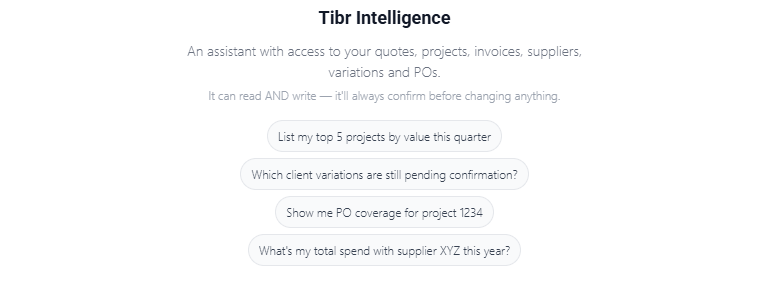
Ask your whole business a question
A conversational assistant that reaches across quotes, projects, purchase & subcontract orders, tenders, invoices and valuations. Ask in plain English and it pulls the live numbers — then turns the answer into a branded PDF you can send to the board.
Your numbers, in a sentence — and a board-ready PDF
No dashboards to learn. Ask the question you'd ask a commercial manager, and Tibr Intelligence answers from your own data — live.
- Plain-English answers spanning quotes, projects, POs & subcontract orders, tenders, invoices and valuations
- Live WIP, CVR and valuation pulled straight from your data — with an interactive panel for project or company-wide views
- Turn any answer into a branded A4 PDF — your logo and colours, page-numbered, ready to share
- Use it inside Tibr, or connect the same assistant to Claude — opt-in per company, your data stays scoped to your tenant
Tibr Intelligence reads — and, when you ask it to, acts — across your account. Changes to your data are always shown before they land.
Run Tibr from the AI you already use
Prefer to work in Claude? Add Tibr as a secure per-company connector and the same assistant reaches straight into your live data — quotes, projects, purchase & subcontract orders, financials and your Digital Workforce — without leaving the chat. It reads first, and any change is proposed for you to approve, exactly as it is in-app.
Your whole company, one connector
Turn it on per tenant and Tibr Intelligence answers from your own data inside Claude — with the same permissions, and the same guardrails, as the panel in the app.
- Opt-in per company — an admin enables the connector; every request stays scoped to your tenant with your own permissions applied
- Ask across live quotes, projects, POs & subcontract orders, tenders, invoices, WIP, CVR and valuations — the same reach as the in-app assistant
- Your saved Playbooks appear as ready-made prompts — run the same governed workflow from Claude that your team runs in-app
- Manage your Digital Workforce from chat — see the assignment board, hand out a job, nudge a worker
- Write actions are proposed, never silent — the same Approve / Reject gate, and every change shown before it lands
One connector, your whole company — turned on per tenant, governed by your admins, and always read-first.
Ask for a proposal. Get a designed, on-brand document.
A step beyond data PDFs. Tibr Intelligence composes full client-facing documents — proposals, capability decks and pitch documents — from a curated library of professionally designed page blocks and your own brand themes. Describe what you need; it lays out the pages, places your imagery and copy, turns your numbers into charts, comparisons and diagrams, and renders a polished PDF — then saves the result as a reusable document type your whole team can run again.
A brand system, not a blank page
The assistant only ever builds from your blocks, your brand and your imagery — so what you send looks designed, on-brand and unmistakably you, every time.
- Compose proposals, capability decks and pitch documents from a library of designed page blocks — each block carries a worked example the AI fills in
- Multi-brand themes — palettes, logos, fonts and page geometry. Seed one from your brand kit in a click, then every document stays on-brand
- An image & font asset library, auto-described and tagged on upload, so the assistant reaches for the right logo or photo by name
- Need a tweak? Revise a single page in place — no rebuilding the whole document — then re-render to a fresh, page-numbered PDF
- Every block is versioned and governed, with a company gallery of everything you've sent — managed under Settings → Document Studio
Already send proposals you love? Bring them in.
No blank page, no rebuild. Upload a PDF of a deck or proposal you already send and Tibr reads it page by page, then recreates it from your block library, in your brand.
- Import a PDF deck or proposal — Tibr analyses every page and rebuilds it from your designed blocks and theme
- Embedded images are harvested automatically into your asset library — auto-described and tagged, no re-sourcing artwork
- Page by page, map to an existing block, draft a new one, or skip — you approve exactly what goes in
- Keep the result as a reusable document type — then re-run it from a kickoff: pick the type, brand style and paper size, fill the brief
Build a document type once. Your team runs it.
Every proposal or deck you build can be saved as a reusable document type. They live together in the Studio hub — pick one, fill a short brief, and render a fresh, on-brand PDF. Nobody starts from a blank page again.
- A hub of document types — sales decks, capability statements, tier comparison reports — each a one-tap starting point
- Every type carries its own kit: the brand theme, the blocks it builds from and its featured images
- Run a type to produce a new document, or duplicate it to spin a variant for a different brand or sector
- Create a new type two ways — from a short description, or from a file you upload — then reuse it for every job
Charts, comparisons and diagrams — not just words
A proposal that wins reads like it was designed by a studio. Document Studio composes data-rich pages — turning your figures into charts, your options into a clean comparison, and your process into a diagram — every one drawn in your brand palette.
- Charts that fit the data — bar, horizontal-bar, line, area, pie, doughnut or stacked — theme-coloured, with value labels and an optional trend line
- Comparison & feature matrices — tier ladders or us-vs-them, each cell a tick, cross or value, with a highlighted recommended column
- Diagrams from a line of text — flowcharts and sequence diagrams rendered as clean vector graphics in your brand colours
- A curated icon set the assistant places inline and tints to your theme — so a page reads, not just lists
The right imagery, sourced for you — not stock-photo guesswork
A proposal lands harder when it shows the actual site. Document Studio can go and find the imagery a page needs — the real project location, the client's own brand, or clean stock — and drop each one into your asset library, tagged and ready to place.
- Capture the actual site — Google Street View and satellite / aerial imagery of the project address, straight into your assets for a “here's your site” cover
- Pull the client's own brand — scrape their logo and hero shots from their website, so the document looks made for them
- Search clean stock — Unsplash photography and Wikimedia place imagery offered as direct, on-topic candidates, not a web-search guess
- Everything lands as a tagged, reusable asset — auto-described on arrival and scoped to your company, so you can reuse it on the next job
Block Library
Designed page blocks — covers, capability grids, KPI strips — each versioned and reusable. Edit the metadata, or go deep into the HTML and slots.
Brand Themes
Multi-brand palettes, logos, fonts and page geometry. Seed a theme from your brand kit in one click and preview it live.
Asset Library
Drag-drop logos and photography — or let the assistant source site, brand and stock imagery for you. Everything's auto-described and tagged, so the right image is a name away.
Built from your blocks and your brand — never invented imagery or numbers. Curation is admin-controlled under Settings → Document Studio.
Package a job once. Run it the same way every time.
A Playbook turns a repeatable job into a one-tap workflow for Tibr Intelligence — whether that's building a priced quote, composing a client document or reviewing your numbers. Each one bundles a curated set of tools, plain-English do's & don'ts and a starter prompt, so anyone on the team runs it exactly the way you intended.
Build & price
Estimating playbooks that build a sectioned, priced quote — gathering the details in a guided form, or reading the spreadsheet you already use.
Compose a document
Document Studio playbooks that lay out a proposal, capability deck or tier-comparison report from your blocks and brand — same skeleton, bespoke content.
Review & report
Read-only analysis playbooks — a monthly CVR review, a single-project health check, tender shortlist prep — that walk your live data the same way every time.
Estimating playbooks — a quote from a conversation
The newest playbooks don't just read your data, they build a quote. Ask for a price and the playbook collects what it needs in a short form, then prices a clean, sectioned estimate from the rates you set.
- No attachment needed — a guided form gathers the details, then prices from your built-in rates
- Or start from the spreadsheet you already use — the playbook reads it and builds the same structured, sectioned quote
- Consistent pricing logic — your sections, cost build-up and target margin applied the same way on every job
- You review before it lands — the drafted lines come back for your approval, never written behind your back
Repeatable, governed, and easy to build
Capture the way your best estimator or commercial manager works, then let everyone run it on demand — with the guardrails you set baked in.
- Bundle the tools, do's & don'ts and a starter prompt into one named playbook your whole team can reuse
- Keep the assistant on the rails — scope it to just the playbook's tools (hard limit) or let it range wider (soft), per conversation
- Draft a playbook from a plain-English brief — AI proposes the tools, guardrails, arguments and icon for you to review and approve
- Run them in two places: the picker inside the in-app panel, or as ready-made prompts on the Claude connector
- Usage analytics show which playbooks get used and when — managed by admins under Settings
Starter playbooks ship ready to use — duplicate one, tweak the tools and guardrails, and make it yours.
Set it once. Tibr watches the numbers for you.
Beyond answering on demand, Tibr can run on a schedule — watching your live data and telling the right people the moment something moves. Pick what to watch, how often it checks, and where the alert lands: email, Slack or Microsoft Teams.
Project GP movement
Get alerted the moment a project's overall gross profit moves — in £ and %, in either direction — since the last check. Set a threshold, or catch every move.
Line overspend digest
A periodic summary of active projects carrying overspent lines — where PO commitment has crept over the line budget — so nothing slips by unseen.
Scheduled playbook runs
Run a saved playbook on a schedule and have its report sent out. It runs read-only — it reports, it never changes your data.
Choose the cadence — and the channel
Every automation runs on its own timetable and delivers wherever your team already works. Connect a channel once; switch it on per automation.
- Schedules from every 15 minutes to hourly, daily, weekly or monthly — set per automation
- Delivered by email, Slack or Microsoft Teams — connect a channel webhook once, then toggle it on for any automation
- GP-movement and overspend alerts arrive with a sortable Excel (.xlsx) attached — ready to filter and share
- A full run history with last-run status and summary, plus a Run-now button to test any automation on the spot
- Created and governed by admins under Settings → Automations
One scheduled-task platform — with new checks and channels added over time. Automations report; they never change your data.
Give Tibr Intelligence a desk in your team chat
Beyond answering when you ask, Tibr Intelligence can take on a named seat on your team. A Digital Workforce assistant is a persona you brief once — its job, its rules, its own memory and a scoped set of tools — that then lives in your Slack or Microsoft Teams channels: it answers when @mentioned, wakes itself when your numbers move, and works to a schedule you set — or takes on a whole brief and owns it over days, chasing the job to done on an assignment board you can watch. Give it its own email inbox and it works that channel too — reading, filing and replying like a colleague. And when you'd rather just talk it through, jump on a live video call and hash it out face to face.
Lives in Slack
@mention an assistant in a channel and it replies in-thread. It follows the conversation in its own channel, reads files you drop in, and can even hand off to another assistant.
Watches your data
Subscribe an assistant to the moments that matter — a quote goes live, a PO is authorised, a project's GP moves, an invoice ages — and it wakes itself to weigh in the second it happens.
Works to a schedule
Recurring or one-off, in your timezone — “every weekday at 8am”, “last Friday of the month”, “once, next Tuesday” — the assistant runs itself and posts the result.
A colleague who never misses the moment
Give an assistant a name, a one-paragraph brief and its own standing memory, then let it react to your business as it happens — in the channel where your team already talks.
- Brief it like a new hire — its job, its do's & don'ts and a scoped toolset, plus a memory it carries between conversations
- Reacts to live events — quote gone live, PO authorised, GP moved, invoice aged — read-only, with a “fire a test event” button to prove it end-to-end
- Remembers what was said — reach back through the channel’s history on demand when someone says “as I mentioned last week”
- Every run is logged and costed, and read content is treated as data — never as instructions to the assistant
It can act — but only when you tap Approve
Assistants are read-only by default. Turn on “can propose actions” and an assistant will build the change from your real data — then stop, and post it to Slack as an Approve / Reject card. Nothing is written until a person clicks.
- Two clear modes — Read-only, or Can propose actions — set per assistant, with an amber badge on any that can act
- Human-in-the-loop by design — a proposed write posts as a Block Kit Approve/Reject message; the assistant never claims a change is done before you approve
- First tap wins — approvals are atomic and run as the assistant’s user, and the Slack card updates in place with the outcome
- Set up and governed by admins under Settings → Digital Workforce
Hand it a whole job — and watch it work
Reacting in the moment is one gear. The other is ownership: give an assistant a brief — “get the Quayside canopy priced”, “reconcile the supplier price list” — and it takes on the whole thing as an Assignment, working it across turns, days and channels until it's delivered. You follow every step on the assignment board.
- A brief it owns, not a one-off answer — each Assignment keeps a fixed brief, a living plan it ticks off, a one-page “state of play”, and an append-only journal of what it did and when
- It chases itself to done — a built-in heartbeat wakes the assistant to make the next bit of progress, so a long job keeps moving without you re-prompting at every step
- The board is your window — every worker's open jobs in one place with status, priority, progress, next action and deadline; open the detail for the plan as a checklist, the journal timeline, and every file it produced with download links
- Approve, reject or nudge right there — a channel-less worker's proposed writes surface on the board as amber “Awaiting approval” cards; approve and it runs exactly as a Slack approval would, logged with who decided. Drop it a message and it picks the job straight back up
- “Done” means delivered — a worker can only close an Assignment once the deliverable has verifiably reached the requester, not because it believes it did — so “finished” always means finished
On Microsoft Teams? It works there too
Not everyone lives in Slack. The same assistant can take a seat in Microsoft Teams — message it in a chat and it answers from your live data, with the very same Approve / Reject safety, this time as native Adaptive Cards.
- Two-way chat, right in Teams — message the assistant and it replies in-thread from live Tibr data, keeping the running context of the conversation. Drop in a file or image and it reads it
- Claim a chat for an assistant — type
bind Avaand that conversation is hers; one bot fronts your whole workforce, and you can unbind any assistant from the Digital Workforce page - The same Approve / Reject leash — a proposed write arrives as an Adaptive Card with buttons; nothing lands until a person taps, exactly as on Slack
- Connect once, locked to you — wire it up under Settings → Digital Workforce, optionally pin it to your own Microsoft tenant so no other directory can reach the bot. The bot secret is stored encrypted
Give it its own inbox, too
Slack is where your team talks — but suppliers and clients still email. Hand an assistant a real mailbox and it works that channel like a colleague: reading every message, filing it to the right folder, and drafting the reply — while every send stays on a leash you set.
- A real email address of its own — Microsoft 365, Google Workspace, plain IMAP/SMTP, or a Tibr-managed staff subdomain with no provider to set up — wired in a five-step wizard with a live SPF/DKIM/DMARC readout
- Reads, files and tidies on its own — those moves write through to the real mailbox, so a teammate in Outlook or Gmail sees the same folders. Reading an email can never make it change your data
- Sending sits on a graduated ladder — from every send approved, to replies to known contacts flow freely, to an allowlist you set. Read-only assistants can never send at all
- Safe by default — per-recipient rate limits, macro or executable attachments always held for a human, and DMARC monitoring that flags anyone spoofing the address
Or just talk it through — face to face
Sometimes it's quicker to say it out loud. Start a live video call with an assistant and you get a talking avatar that hears you through your mic, looks things up in your real Tibr data as you speak — even sharing its screen so you can watch — and hands you the finished document before you hang up.
- Brief it before you dial — jot an agenda and the assistant preps from it, so the opening minute is already on-topic
- Show it a plan mid-call — drag a drawing, PDF or photo onto the call and it reads it with vision, then talks you through what it sees
- It shares its screen, read-only — ask to see a quote or project and it opens the real Tibr page live on the call, scrolling the actual figures with you — view-only, so nothing can be changed, and the share is audited on the note
- Leave with the document in hand — “email me that quote” or “put the overspend into a board pack” and it prints the real file — quote, purchase order or Excel report — and drops it straight into the call as a download
- Live look-ups, on the record — it pulls real figures while you talk, and every tool call is audited on the meeting note; a read-only assistant stays read-only, and any change it wants becomes an Approve / Reject card
- A write-up you can trust — hang up and it saves the notes, schedules what you agreed and proposes the actions, with every past call kept in a run-log
Bring your team the assistants they need — a commercial watcher, a procurement hand, a reporting analyst — each on its own brief, in Slack or Microsoft Teams, over email and on a live call — the channels where work already happens.
Describe it. Review it. Apply it.
Right-click any item or section and open AI Edit. Every proposed change is colour-coded and editable before it touches your quote.
Plain-English changes
"Populate a meeting room from this spec", "add installation to those lines", "drop every margin to 18%" — one instruction at a time.
Import from documents
Drag in a PDF, Excel, Word doc or image. Tibr extracts the line items and structure. Files are processed securely and deleted after the session.
Reviewed & reversible
INSERT, UPDATE and DELETE operations are colour-coded. Expand any one to edit buy, sell, GP% and quantity. Apply, then undo if needed.
Adds new line items, sections or sub-items where you ask.
Edits prices, quantities, margins or descriptions in place.
Removes lines — always shown before anything is committed.
Recurring supplier formats? Teach Tibr once.
The same suppliers send the same layouts every week. An AI Import Profile saves the instructions and reference files for one of those formats — pick it from the dropdown and AI Edit already knows how to read it. No re-explaining the columns each time.
- Save a format once — the instructions and reference files for a particular supplier quote or BOM layout, kept as a named profile
- Pick it from the Profile dropdown before you send — AI Edit maps the same columns the same way, every time
- Consistent imports across the team — anyone pricing that supplier reuses the profile, so line items land structured, not guessed
- Created and governed by an admin under Settings → AI Import Profiles
Looks things up as it works
When a job needs an external detail — a product spec to cite, a material it doesn't recognise — AI Edit searches the web mid-task, shows a “Searched the web” chip, then carries on building your operations. No setup.
A real Unit column
Where the source states a unit of measure — each, No., m, m², lm, kg, hrs — AI Edit records it into the line's dedicated Unit column instead of burying it in the description, so your quote stays clean and sortable.
Choose speed or depth, per task
Pick the right model for the job from the selector — and watch the live cost in £ as you go.
Haiku
Quick, simple changes at the lowest cost — perfect for fast tweaks.
Sonnet Default
The everyday workhorse for most estimating tasks. Start here.
Opus
Deep, multi-document analysis when the job is genuinely complex.
Know the cost — and cap it
Tibr meters every AI action in real pounds and shows the running total to your whole team — then lets you put a hard ceiling on the month. The AI bill becomes a number you chose, never a surprise.
- Live £ per task — the model selector shows the price as you go, so there are no black-box tokens to reconcile later
- A shared AI Usage page — everyone, not just admins, sees this month's spend under Settings → AI Usage, filterable by person, surface and date
- A monthly spend cap — set a ceiling in £ for the whole company. Reach it and AI pauses gracefully across every surface — Talk to Tibr, AI Edit, reports, help and the Digital Workforce — until it's raised or the month resets
- Admin-controlled — everyone watches the same gauge; only an administrator sets, raises or removes the cap
Six built-in reports — plus anything you can describe
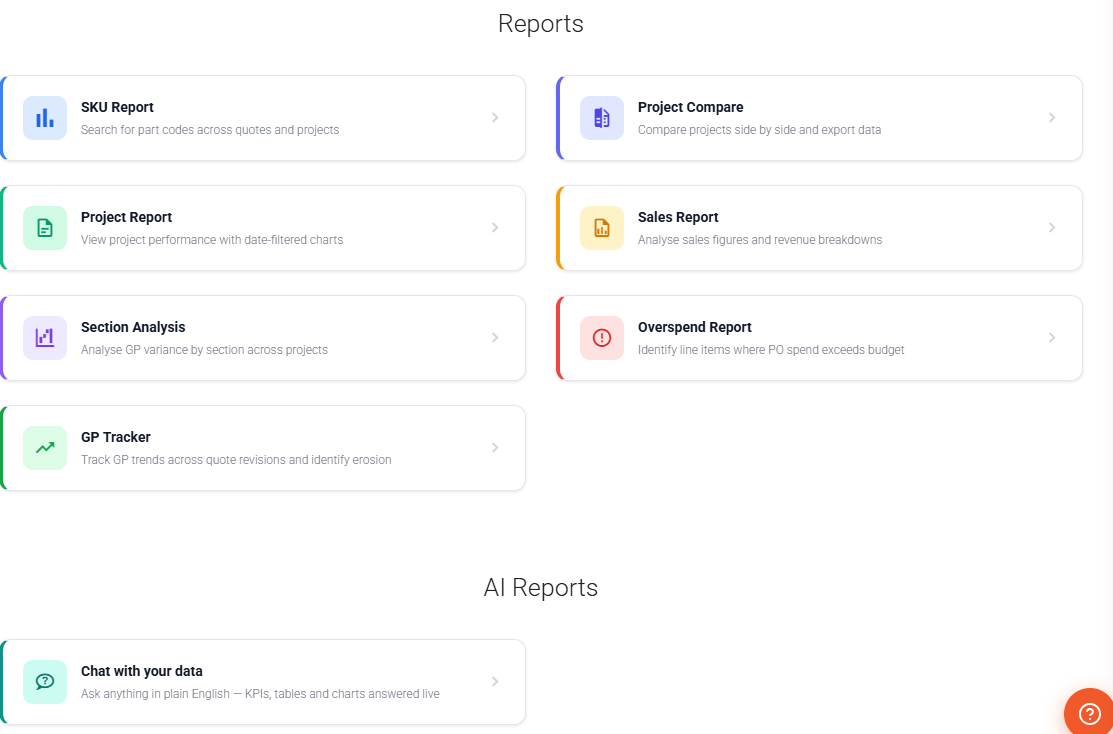
Any report, just by describing it
"Show me projects with GP below 20% in the last 6 months." Tibr generates the report definition; you add parameters, set visibility and save.
- Six built-in reports: SKU, Project Compare, Project, Sales, Section Analysis, Overspend
- Build custom reports from a plain-English brief
- Private, Company or Shared visibility
- Plus Report Chat — ask your data anything in plain English, live (more below)
Or just chat with your data
Open Report Chat and ask in plain English — "supplier spend this quarter", "invoices overdue grouped by client". Tibr reads your live data, read-only, and renders KPI cards, tables and charts on the canvas. Drill into any row, filter with a click, and keep the ones you'll run again.
- Plain-English answers, rendered live — KPI cards, tables and charts, with drill-down rows and one-click filter chips
- Presentation themes — Executive, Minimal, Print or your own Brand Kit, saved with the report so it replays the same look
- Save & pin — keep reports as Company or Private, and pin up to five as one-click favourites
- Open as a live dashboard — full-screen and auto-refreshing on a timer from one minute to once a day, with a shareable in-company link
Help that knows where you are
A built-in assistant on every page. Tap the helper or press ? and Ask Tibr answers in the context of your current screen, your role and the modules you have switched on — grounded in how Tibr actually works.
On every page
A floating helper follows you across Tibr — or press ? from anywhere to open it, Esc to close. No hunting through a separate help site.
Knows where you are
Answers are scoped to the screen you're on, your role and the modules you've switched on — so you get the path that fits your setup, not a generic one.
Grounded in how Tibr works
Replies come from a maintained knowledge base spanning quotes, projects, POs & subcontract orders, tenders, variations, invoices, valuations and CVR.
Streamed, readable answers
Responses stream in as they're written, laid out as clear steps — not a wall of text — so you can act on the first line before the rest arrives.
Points to the exact place
Get the precise menu path, shortcut or setting to use next — then copy the whole answer to your clipboard in a single click.
A specialist inside CVR
A dedicated Ask tab lives inside the CVR, grounded in the commercial columns and WIP so it can explain the numbers in front of you.
Ask Tibr only answers questions — it never changes your data. Need to make a change? That's what AI Edit is for.
Watch AI Edit build a real estimate.
Book a demo and bring a drawing or a supplier quote — we'll turn it into priced lines live.