
One connected workspace for the whole commercial lifecycle
From the first priced estimate to the final account, every module shares one model — so your numbers stay consistent from tender to reconciliation.
Tap any feature below to see how it works.
Estimate
Quote editor, AI Edit, takeoff and fast quotes get accurate prices out the door fast.
Win
Convert a won quote to a live project — structure, budget and authoriser carry across.
Deliver
Procure with POs, SCOs and competitive tendering; control change with variations.
Final account
Value the work, invoice in phases, and reconcile cost against value, live.
Price more work, in less time
The Quote Editor
A fast, hierarchical estimator with full keyboard control and instant GP adjustment.
Learn more →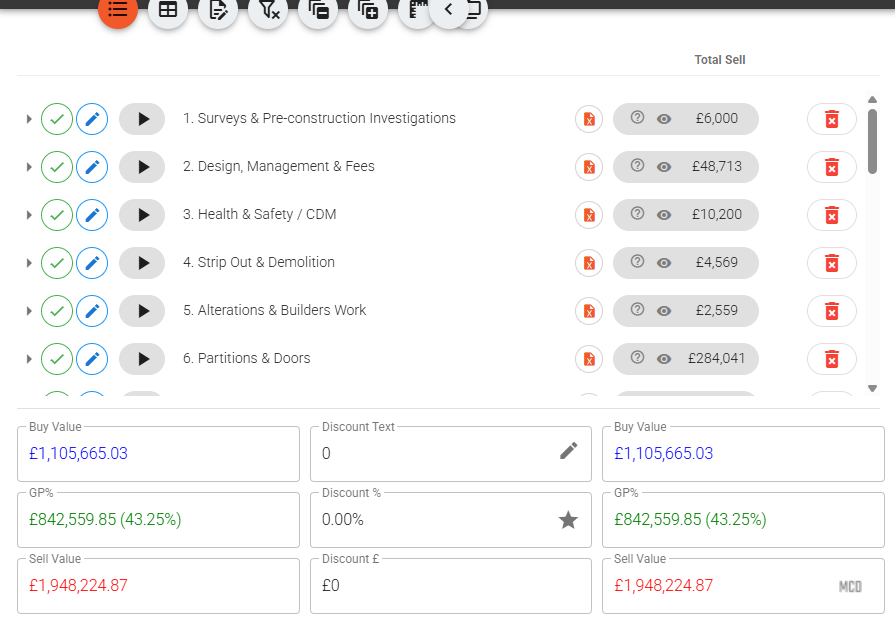
Build estimates as a tree of sections, line items and sub-items. Select any line (or several) and adjust GP while the sell price recalculates live — GP% = (Sell − Buy) / Sell.
- Keyboard-driven: Alt+A adds a line, Alt+S a sub-item, Alt+arrows move & nest
- Multi-select to copy, paste, highlight or delete whole branches
- Four item statuses — Included, Excluded, No Money, Below The Line
- Flag items for reviewer attention without affecting price
Numbering, versioning & revisions
One set of rules numbers your quotes, versions every revision and names the documents — so there's always one quote that's live.
Learn more →Set the rules once and every new quote auto-fills its reference, name, version label and download file name. Each quote then keeps a revision tree — start a new revision, set any one live, or compare two and read the sell delta. Existing quotes are never touched; the rules only apply to new work.
- Auto reference, name, version & download file-name rules
- Describe the rules in plain English, or set them by hand
- A revision tree per quote — New revision, Set live, Compare
- Version labels as A, B, C, as 1, 2, 3 or in Roman numerals
Presentation Mode
Show a client your screen without revealing a single margin.
Learn more →One click hides every commercial figure — buy values, GP%, adjust-GP controls, cost breakdowns and the discount box — while item names, descriptions, sell prices, quantities and the total stay on screen.
- Toggle from the toolbar eye icon or the hamburger → Display menu
- Optionally reveal the discount and pre/post totals to the client
- Display-only — nothing is saved or changed
Takeoff
Measure quantities straight off PDF drawings — then link them to your estimate so they stay in step.
Learn more →Calibrate each drawing page to scale, measure lengths, areas and counts into named groups, and combine them with analyses. Then link a quote line's quantity to a measurement, a group total or an analysis — change the takeoff and a drift badge flags every line that needs review. Drawings carry through to the project as job documents.
- Per-page calibration, then Linear, Area & Count tools
- Group Σ totals and analyses (points / length in area, overlap)
- Link a line's quantity to a measurement, group total or analysis
- A drift badge flags when the takeoff changed or a qty was edited
Fast Quotes
Template-driven quoting that switches whole systems on and off.
Learn more →Author your pricing model in Excel with the Tibr add-in, then pick a template, turn on the systems you need, and Tibr calculates transport & access, attendance and programme times for you. Output is a polished Excel quote.
- Templates authored in Excel via the Tibr add-in, kept versioned
- Systems off by default — enable only what applies
- Auto-calculated transport, attendance & programme times
- Print by level and exclude £0 lines on export
Products & Price Tables
A reusable cost library, rate cards and base costs.
Learn more →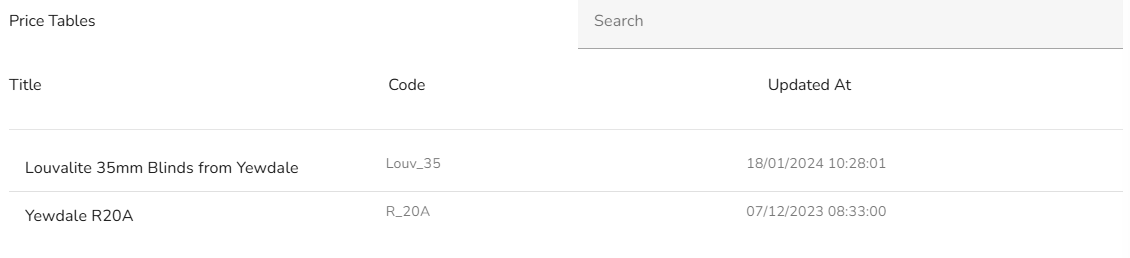
Keep your items and costs in one library by category, attach client- or job-type rate cards, and build line costs on underlying base rates — so the right pricing applies every time.
- Products library pulled into quotes and fast quotes
- Price Tables — rate cards attachable per quote
- Base Costs underpin line-item pricing
Spec Library
Reusable rich-text specification blocks you drop into any line.
Learn more →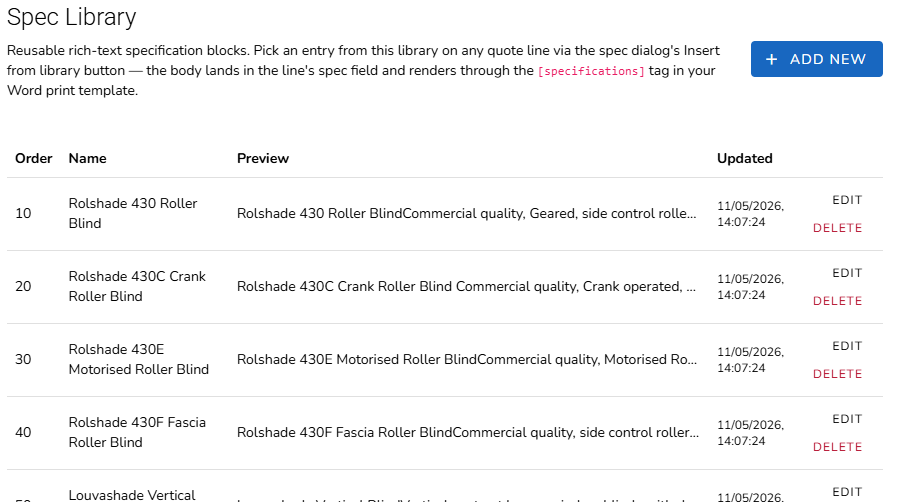
Maintain a library of standard specification text and insert it into a line's spec with a picker. It renders into your branded Word output via the [specifications] tag.
- Insert standard specs from a picker
- Rich-text blocks managed in Settings → Spec Library
- Flows into the Word quote template automatically
Default Quote Items
Start every new quote from your standard set of lines — so nothing routine gets missed.
Learn more →Configure a Default Quote Items template and new quotes can auto-populate with your standard lines, keeping every estimate consistent and complete from the first click. Set it once in Settings → Default Quote Items.
- Auto-populate new quotes from a saved template
- Keep your standard lines consistent across estimators
- Managed in Settings → Default Quote Items
Never lose track of which quote is live
When a client asks for changes, revise — don't overwrite. Tibr versions every quote, keeps one marked live, and shows you line-by-line what changed between any two — with the sell delta in black and white.
One quote is live — and every earlier number is still there
A new revision clones the live one and advances the label, so the original is never lost. Set any revision live and the whole team sees the same authoritative version.
- New revision clones the live quote and advances the version — Rev A → B → C — leaving the original intact
- Set live marks one revision authoritative; the Quotes list shows which one at a glance
- Compare any two revisions for added, removed & changed lines and the sell delta
- References, names, version labels & download file names auto-fill from rules you set once — described in plain English or set by hand
- Existing quotes are never touched — conventions apply only to new work
No more final-FINAL-v3.xlsx — the live quote is obvious, and every earlier number is still there to explain how you got here.
Build your pricing model in Excel — quote from it in minutes
Systemised, repeatable pricing lives in a spreadsheet your estimators already trust. Fast Quotes lets you author that model in Excel with the Tibr add-in, then run it as a guided quoter — pick a template, switch on the systems you need, and a polished Excel quote comes out the other end.
Author the template where the pricing already lives
No re-keying your logic into a foreign tool. Install the Tibr Excel add-in, build the template inside Excel, and it becomes a live Fast Quote template — versioned and ready to use.
- Download the Excel add-in from Settings → Templates → Fast Quote Templates, and create new templates from inside Excel — not by uploading a file you hope maps correctly
- Systems off by default — un-exclude only the ones a job needs; each exposes its own options for Transport & Access (incl. supply-only), Attendance and Programme times
- The maths is calculated for you — transport & access, attendances and programme times auto-compute as you toggle, and stay adjustable line by line
- Polished Excel out — print by level (room-by-room or floor-by-floor), show optional-item totals and drop £0 lines, down to the level of detail you choose
A versioned template library — never a folder full of pricing-v7-FINAL.xlsx
Every template keeps its history in one place, so you can evolve your pricing without losing what won you the last job.
- Versions grouped under one name — the latest shows as Newest; expand the row to reach every earlier version you've published
- See what's actually in use — a Quotes count on each version tells you how many quotes were built from it before you retire or change it
- Drag to reorder — the order here is the order estimators see in the start-screen dropdown, so the templates you reach for sit on top
- Download, Rename, Duplicate or Delete per row — duplicate one to spin up a new template from a proven base, all without leaving Tibr
Fast Quotes is part of Tibr Enterprise estimating — no extra module required.
Measure once — the estimate stays in step
Take quantities straight off the PDF drawings you're issued, then link them to your quote lines. When a drawing is re-measured, Tibr tells you exactly which lines have drifted — so a revised drawing never quietly leaves your price wrong.
Basic takeoff is on every plan — measure quantities off your PDF drawings and pull them into a quote. This module is for teams doing serious measurement: it adds the named groups, saved analyses and drift-linked quantities below.
From the drawing to the line, without re-keying
Open Takeoff from the quote, calibrate each page to scale, and measure into named groups — then pin your line quantities to what you measured.
- Per-page calibration, then Linear, Area and Count tools measured into colour-coded groups
- Combine measurements with analyses — points-in-area, length-in-area or area overlap
- Link a line's quantity to a measurement, a group Σ total or an analysis — no double-entry
- A drift badge flags when the takeoff changed, or a quantity was edited away from its link — review, update or unlink per line
- Drawings carry through to the won project as job documents
Quantities only change when you choose — Tibr surfaces the drift and leaves the decision with you.
Your brand on every document you send
Upload your own Word templates and Tibr fills them from the live quote — client, project, estimator, dates, specs and totals. What lands in the client's inbox looks like you, not like software.
Write the template once — Tibr fills in the rest
Drop merge tags into your branded .docx, keep as many templates as you need, and every quote prints on letterhead with the numbers already in place.
- Upload and keep multiple branded Word templates — managed in Settings → Word Quote Print Templates
- 40+ merge tags auto-fill client, project, estimator, dates, totals & VAT — like [client_name] [quote_ref] [summary_total_inc_vat]
- Spec Library text flows in through the [specifications] tag
- Set currency and decimal / thousands separators per template
- Download file names follow your numbering rules — polished Excel from Fast Quotes and branded A4 PDFs from Tibr Intelligence too
No re-typing, no copy-paste into Word — the document is generated from the quote you already built.
Commit cost with confidence
Tender Board
Tender subcontract packages competitively and compare returns line-by-line.
Learn more →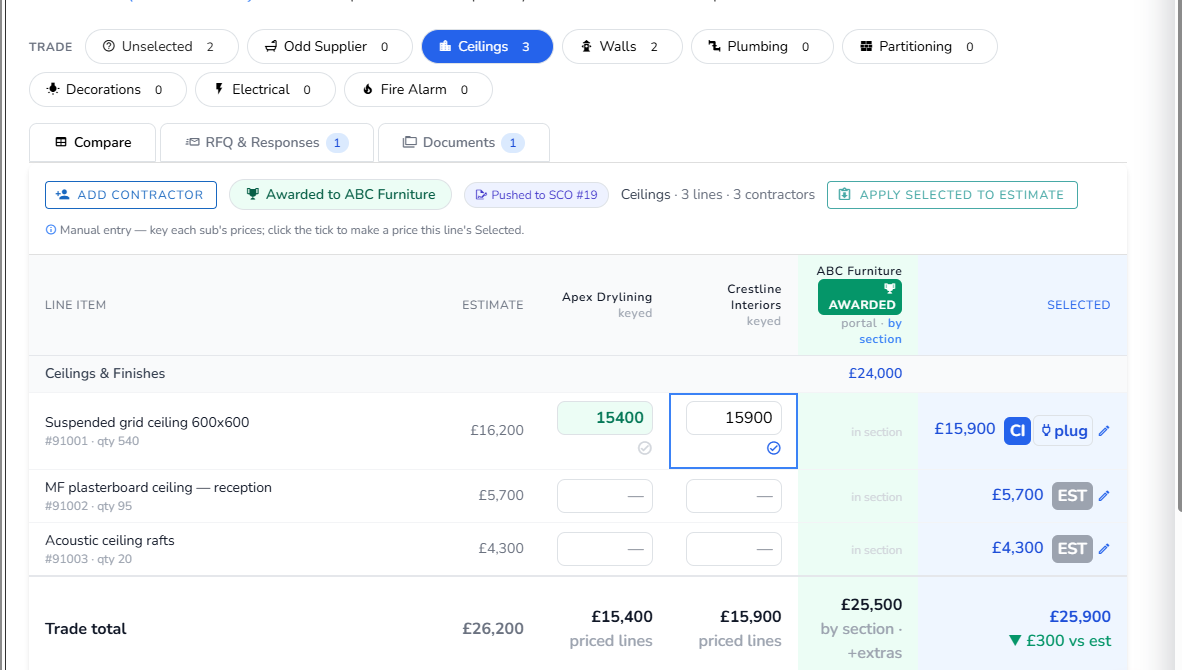
Open a board from any quote or project. Work groups into trade packages; each subcontractor's prices sit in their own column so you can read value item by item, then select the best per line.
- Send portal-first RFQs and record returns
- Target rounds — send your plugged budget as per-line targets for subs to confirm or beat
- Selections held separately from the estimate
- Award a package, then push the winner to SCO and/or PO
- Apply selected prices back to the estimate — audited & undoable
Purchase Orders
Commit lines to a supplier and track committed-vs-estimated cost.
Learn more →Raise POs against project lines to commit spend to suppliers. Tibr tracks committed against estimated cost, and apportionment across grouped and lump-sum lines is handled for you.
- Raise directly from project lines or by awarding a tender
- Committed vs estimated cost tracked per line
- Apportionment handled automatically
Subcontract Orders
Commit work to a subcontractor with its own lifecycle and emails.
Learn more →SCOs commit work to a subcontractor and move through their own lifecycle — raised through to active — with authorisation and automated notification emails.
- Dedicated raised → active lifecycle
- Authorisation and notification emails built in
- Raised from lines or straight from an awarded tender
Document Suite
Issue a subcontract order and Tibr assembles the whole document pack for you.
Learn more →Built on a reference Short Form Order set, the suite bundles the order, Subcontract Conditions, drawing register, attendances, payment schedule, sum analysis, works-package and pre-start minutes — each a separate file to review, edit and send. Define your own suite types under Subcontract Tendering settings.
- Eight documents assembled in one click, as separate files
- Conditions snapshotted from your approved terms, frozen at issue
- No live AI in legal/financial docs — only the works-package scope is AI-drafted, always reviewed
Authorisation tiers
Require approval before an order is issued.
Learn more →Set authorisation tiers so orders need sign-off before they're issued. The authoriser cascades from the team authoriser to the company default, so approvals always have an owner.
- Approval required before a PO/SCO is issued
- Authoriser cascades team → company default
- Approve / decline by email
Project file
Every order you send is filed back into the project automatically.
Learn more →Send a Short Form Order or raise a purchase order and Tibr files the rendered pack into the project's document register — alongside drawings and conditions, revision-aware and tagged by trade. One retrievable record per order, no manual saving.
- Short Form Orders filed on send, head POs filed on raise
- Revision-aware — a re-issue supersedes the older copy, kept not deleted
- Filed with drawings & conditions; one record per order, no duplicates
Variations
Client, internal and subcontractor change control — each handled correctly.
Learn more →Raise a variation from a section in the project table. The three types behave differently: internal variations go for authorisation; client variations track the client's position; subcontractor variations adjust an order.
- Internal — created pending, emailed for approval, counts once approved
- Client — tracks a pending → approved / rejected client position
- Subcontractor — requires a supplier; feeds the sub variation report
Tender → Order
Award a package and push the winner to an SCO and/or PO.
Learn more →
When you award, Tibr can mint one order per trade with group and lump-sum pro-rata apportionment and a balance guard. Subcontractor add-ons resolve by merging into a line or raising a variation.
- One order per trade on award
- Group / lump-sum pro-rata apportionment
- Add-ons merge into a line or raise a variation
Snag the job — through to a signed-off handover
Delivery doesn't end when the order goes out. Walk the site, log every defect against the project with a photo or a video, hold the right subcontractor to the fix, and close it out only when everyone has signed off — all on the same job, not in a separate app.
Catch every defect on site — photo, video and all
Open the project's snag list on your phone and log what you see. Each snag carries the detail that makes it actionable, and the evidence to back it up.
- Category, zone & trade on every snag — each with its own icon, so the list reads at a glance
- Attach a photo or a video clip, captured on site — pinch to zoom in and inspect the detail
- Assign the responsible subcontractor, so the firm that owns the fix is named on the snag
- One snag register per project — saved against the job alongside everything else, not in a separate tool
Three sign-offs to a clean handover
A snag isn't done because one person says so. Each one runs through three completion stages, so a defect only closes when subcontractor, site and client all agree.
- Subcontractor, internal then client sign-off — three stages tracked per snag, so nothing closes prematurely
- Give a subcontractor a scoped login — they see and update only their own snag lists, never the rest of the project
- Export to your own branded Excel template — map the columns once and the list prints with the photos embedded
- Hand the client a clear, evidenced defects list at practical completion — closed items and all
From the first defect on site to the final client sign-off — one snag register, kept with the project.
Protect the margin you quoted
Tibr Intelligence — CVR
Earned value against committed and actual cost, per project.
Learn more →
Cost Value Reconciliation shows earned value against committed (POs/SCOs) and actual cost. Cost pulls from your orders and matched invoices, including Xero where connected.
- Live earned-vs-committed-vs-actual on every project
- Per-section breakdown and forecast margin
- A built-in assistant explains every CVR column
Work in Progress
Company-wide earned-versus-invoiced across active projects.
Learn more →WIP rolls every active project into one company-wide view of earned value against what you've invoiced — the number your board actually wants, refreshed live.
- Earned vs invoiced across all active projects
- Excludes archived work
- Built from the same model as project CVR
Overspend report
Every line where PO spend has exceeded budget.
Learn more →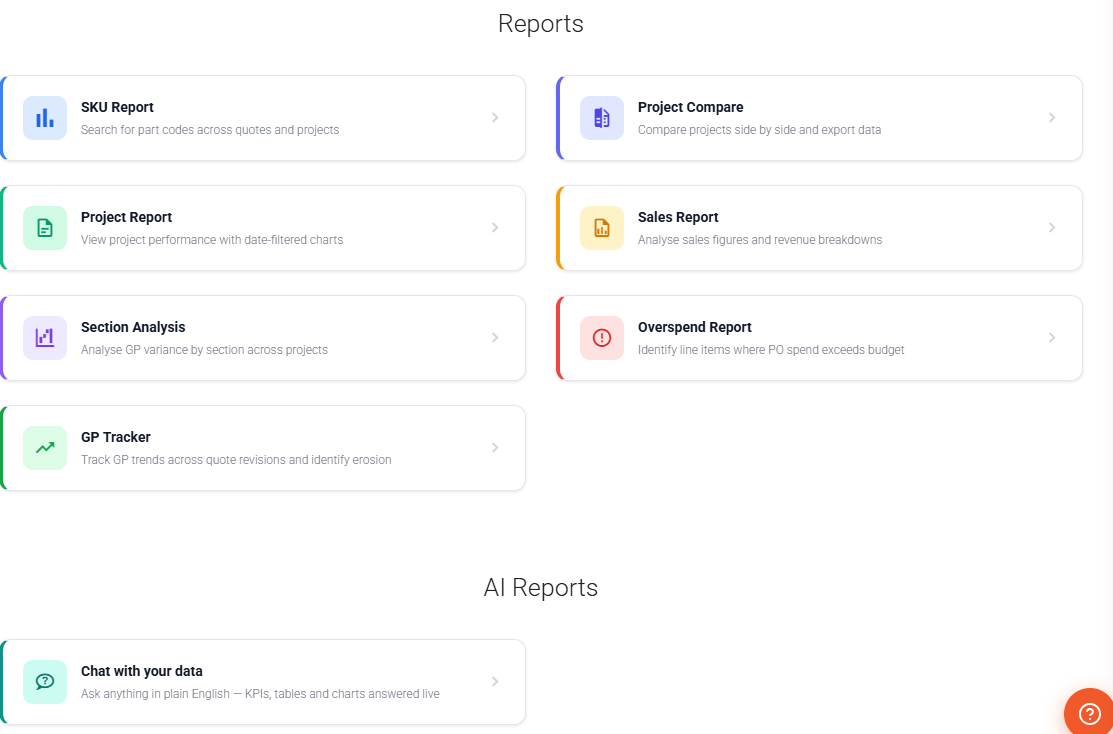
The overspend report surfaces lines where committed PO spend is over budget, expandable for per-line over/underspend, so erosion never hides until it's too late.
- Per-line over / underspend detail
- CSV export
- FX-aware on multi-currency jobs
Invoicing & schedules
Phased billing that must total exactly 100%.
Learn more →Create invoice schedules from a schedule-type quote — fixed %, fixed £ or valuation-based — that must balance to 100%. Tibr drives the approvals and pushes approved invoices to Xero as drafts.
- Fixed % (e.g. 30-40-30), Fixed £, or Valuation-based phases
- Approval emails every Monday for invoices due in 7 days
- Quote → Scheduled → Approved → Authorised lifecycle
Valuations
Applications for payment, valued accurately per period.
Learn more →Value the work done in a period using the project's level quantities, feeding earned-versus-invoiced and keeping cashflow visible.
- Period valuations against each project
- Uses level quantities where set
- Feeds the WIP and CVR position directly
Multi-currency
Quote, order and invoice in any currency.
Learn more →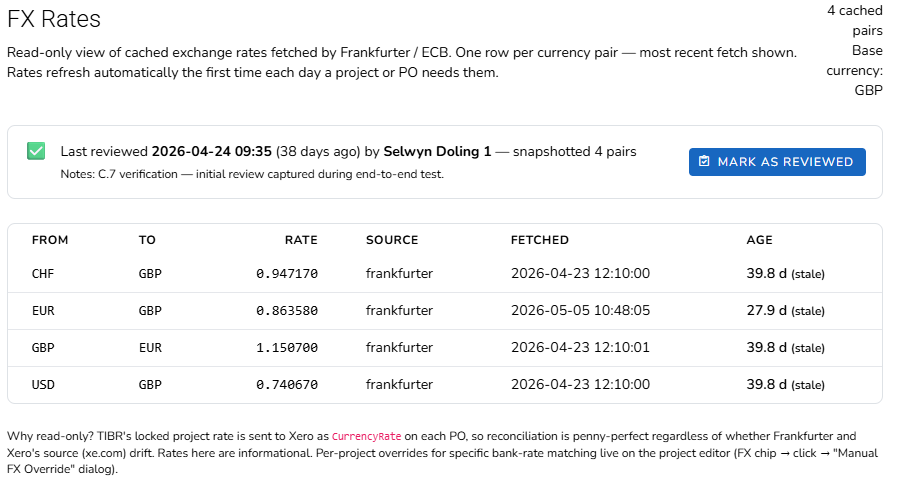
Carry a currency and FX rate on quotes, purchase orders and invoices. Override the rate per project and review rates quarterly — conversion is always project rate ÷ order rate.
- Currency & FX on quotes, POs and invoices
- Per-project manual FX override
- Quarterly review, no surprise retro-conversion
Answers, not just data
These AI capabilities come with your plan — Ask Tibr on every plan, with AI Edit and the AI Report Builder from Pro. They're included, not the separately-priced Tibr Intelligence module (CVR & WIP).
AI Edit
Build and price estimate structures from plain English or uploaded documents.
Learn more →Right-click any item or section and describe the change, or drop in a supplier PDF, spreadsheet or drawing. Tibr proposes colour-coded INSERT / UPDATE / DELETE operations you review and edit before applying.
- Plain-English changes, one task at a time
- Import line items from PDF, Excel, Word or images
- Choose Haiku, Sonnet or Opus per task; live £ cost shown
- Apply, then undo — nothing commits without review
AI Report Builder
Describe the report you need in plain English.
Learn more →
Ask for "projects with GP below 20% in the last 6 months" and Tibr generates the report definition. Add parameters, set visibility and save — alongside six built-in reports.
- Custom reports from a plain-English brief
- Private, Company or Shared visibility
- Conversational Reports → Chat with drill-downs & filter chips
Ask Tibr
An in-app assistant on every page that knows how Tibr works.
Learn more →
Ask Tibr answers in the context of your current screen, your role and the modules you have switched on — pointing you to the exact menu, shortcut or setting.
- Context-aware: knows the page and your setup
- Reads your quotes, projects, invoices, suppliers and POs
- Always confirms before it changes anything
See Tibr Enterprise on your own projects.
Book a walkthrough and we'll show you the estimate-to-final-account workflow on work that looks like yours.